Meeting Minutes Software Compared
For a weekly team meeting, a tool like Fellow, Magic Minutes, Beenote or MeetingBooster links the agenda, the minutes and the action items so nothing gets retyped. For a formal board or committee, a board portal like Boardable or OnBoard adds what a secretary needs: board packets, votes, approval of minutes and control over who sees what. If your group meets once a month and one person writes the minutes, a good template in Google Docs or Word is usually enough, and it’s free. Software starts paying for itself when you need action items followed from meeting to meeting, a sign-off step, or a searchable archive with access control.
This page summarizes each vendor’s own pricing pages and help docs, published reviews and public user posts, with links to all of them. Prices were checked on the vendors’ sites in October 2026.
How to choose
Answer these in order and stop at the first “yes”. Or jump to the tools for boards that approve minutes, for team action items, or if a document is enough.
- Do you run a formal board, with motions, votes, board packets and minutes that must be approved? Look at Boardable for a small or volunteer board, and OnBoard if you have a board administrator and budget. Beeboard is a lower-cost middle option.
- Do action items keep getting lost between meetings? Try Fellow for team meetings or Magic Minutes if one person writes all the minutes.
- Do you need on-premise hosting or a strict approval process across many departments? Ask MeetingBooster or Beenote for a quote.
- Is your team already in Notion, Google Workspace or Microsoft 365? Use a template in the tool you have. Add an action items tracker if follow-up slips.
- None of the above? A free meeting minutes template and an agenda template are enough.
A few more checks before you pay:
- Count who pays. Board portals charge per user, so every director counts. Magic Minutes charges per minute taker only.
- Check the plan for the feature you want. Approvals, eSignatures and AI drafts often sit one tier above the entry price.
- Try it with your real minutes. Use the free trial to write one actual meeting’s minutes and send them out before you commit.
- Plan the exit. Make sure you can export past minutes as PDF or Word, because your archive has to outlast the subscription.
Quick comparison
| Tool | Free plan | Paid price | Works on | Best for | Checked |
|---|---|---|---|---|---|
| Fellow | Yes: up to 5 seats, 5 AI notes and 5 AI recordings per user (lifetime) | $7 per user, billed yearly ($11 monthly) | Web, desktop, mobile | Teams with many recurring meetings | |
| Magic Minutes | Attendees only; 30-day trial for organizers | £60 a month for one minute taker (incl. VAT) | Web | One person who takes minutes for a group | |
| Beenote | 30-day trial, then a limited free mode | $552 a year for 10 users | Web | Committees and teams on Microsoft 365 | |
| MeetingBooster | Free trial | Price on request | Web (cloud or on-premise) | Larger organizations that need formal approval | |
| Boardable | No; 14-day trial | From $20.99 per user, billed yearly | Web, iOS, Android | Nonprofit and volunteer boards | |
| OnBoard | No; trial on request | Price on request | Web, iOS, Android | Larger boards with an admin | |
| Google Docs | Free with a Google account | See vendor's pricing page | Web, iOS, Android | Small groups using a template | |
| Word / OneNote | See vendor's pricing page | See vendor's pricing page | Windows, Mac, web, mobile | Offices already on Microsoft 365 | |
| Evernote | 50 notes, 1 notebook, 1 device | See vendor's pricing page | Web, desktop, mobile | People who keep notes there already | |
| Notion | Yes, with block limits for 2+ members | $10 per member, billed yearly; AI meeting notes need Business ($20) | Web, desktop, mobile | Teams that want minutes in a shared database | |
| Otter.ai | 300 minutes a month, 30 minutes per conversation | $8.33 per user, billed yearly ($16.99 monthly) | Web, iOS, Android | A transcript and summary to write minutes from |
What minutes software adds over a document
A document can hold minutes perfectly well. What it can’t do on its own is connect one meeting to the next. Here is what dedicated tools add:
- The agenda becomes the minutes. You build the agenda in the tool, and during the meeting you type under each item. There’s no copying headings from one file into another.
- Action items follow you. Each item has an owner and a due date, and open items show up again at the next meeting without anyone pasting them in. Some tools also send reminders.
- An approval step. Draft minutes go to the chair or the board for review, then get published or signed. Board tools record who approved and when.
- One archive you can search. Every past set of minutes sits in one place, so “when did we decide that?” takes seconds.
- Access control. Board portals let you decide who sees draft minutes, confidential items and board packets, which matters once you have staff, directors and the public as different audiences.
If none of those is a problem for you yet, start with a template. The meeting minutes template and the board meeting minutes template work in Docs or Word, and the action items tracker handles follow-up across meetings in a spreadsheet. How to write meeting minutes covers the method, and the free notes to minutes tool turns rough notes into a clean draft.
For team meetings
Fellow
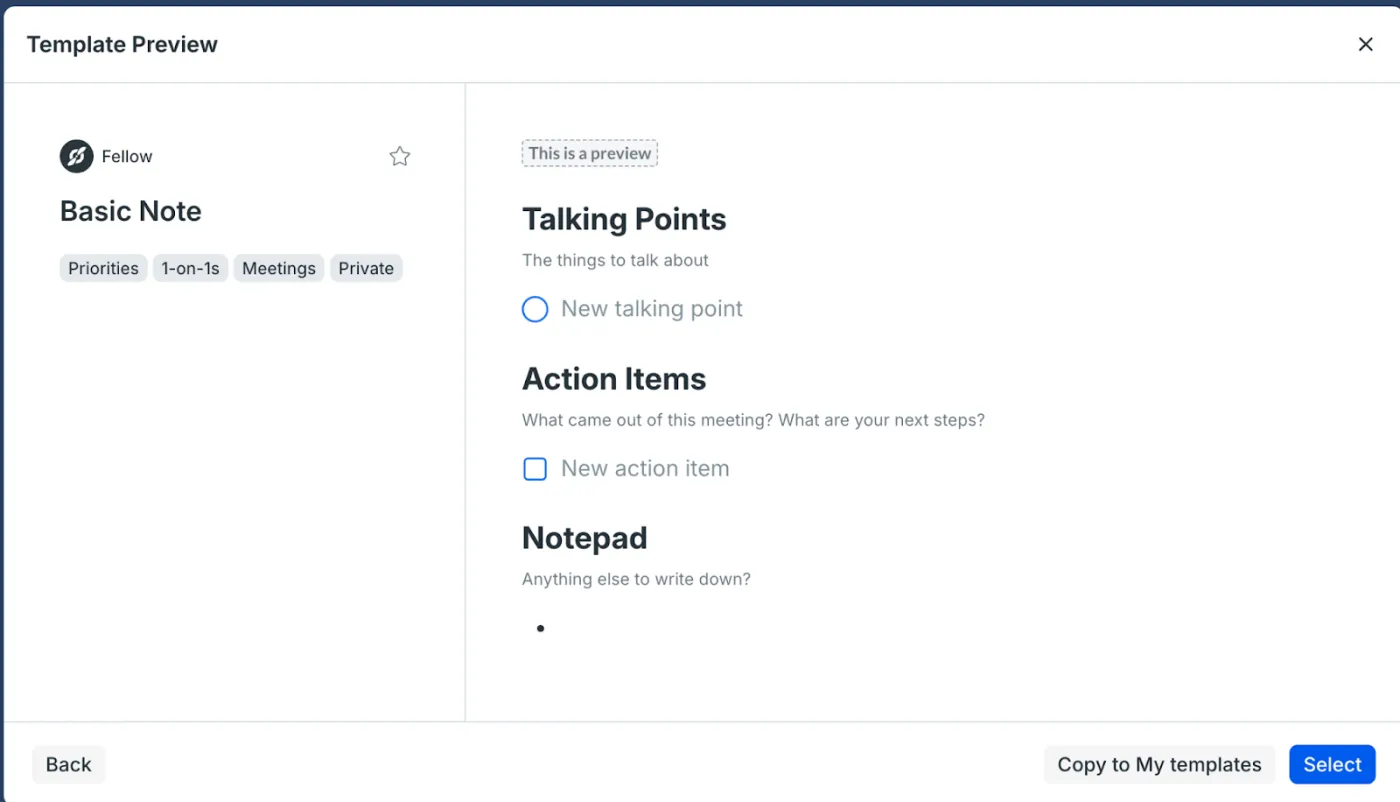
Fellow gives every calendar event a linked meeting note where attendees build the agenda together, take notes and add action items. According to its help article on meeting notes, each new note starts from a basic template with talking points and action items, and recurring meetings keep their full history and carry unfinished items forward. Action items get an owner and a due date and appear on a shared action items page. Fellow also has AI notes and recordings.
Suits: managers and teams with many recurring meetings (one-on-ones, weekly team meetings) who want agendas and follow-up in one place. It isn’t built around formal motions and votes.
Price: free for up to 5 seats, but the free AI allowance is 5 AI notes and 5 AI recordings per user for the life of the account, not per month. Team costs $7 per user a month billed yearly or $11 monthly, and Business $15 or $23 (pricing, October 2026).
What people say: Zapier picks Fellow for data privacy and security in its AI meeting assistants roundup, and lists a buggy desktop app as the downside. In a Reddit thread comparing note takers, one user said: “It summarized topics well, identified decisions and next-steps, and seemed to understand context appropriately.” The same person found exporting the notes manual. Another user in that thread said: “The Fellow app is a resource hog to a point where the Zoom client itself glitches and starts to crash.” G2 rating: 4.7 from 2,440 reviews (G2, checked October 2026).
Magic Minutes
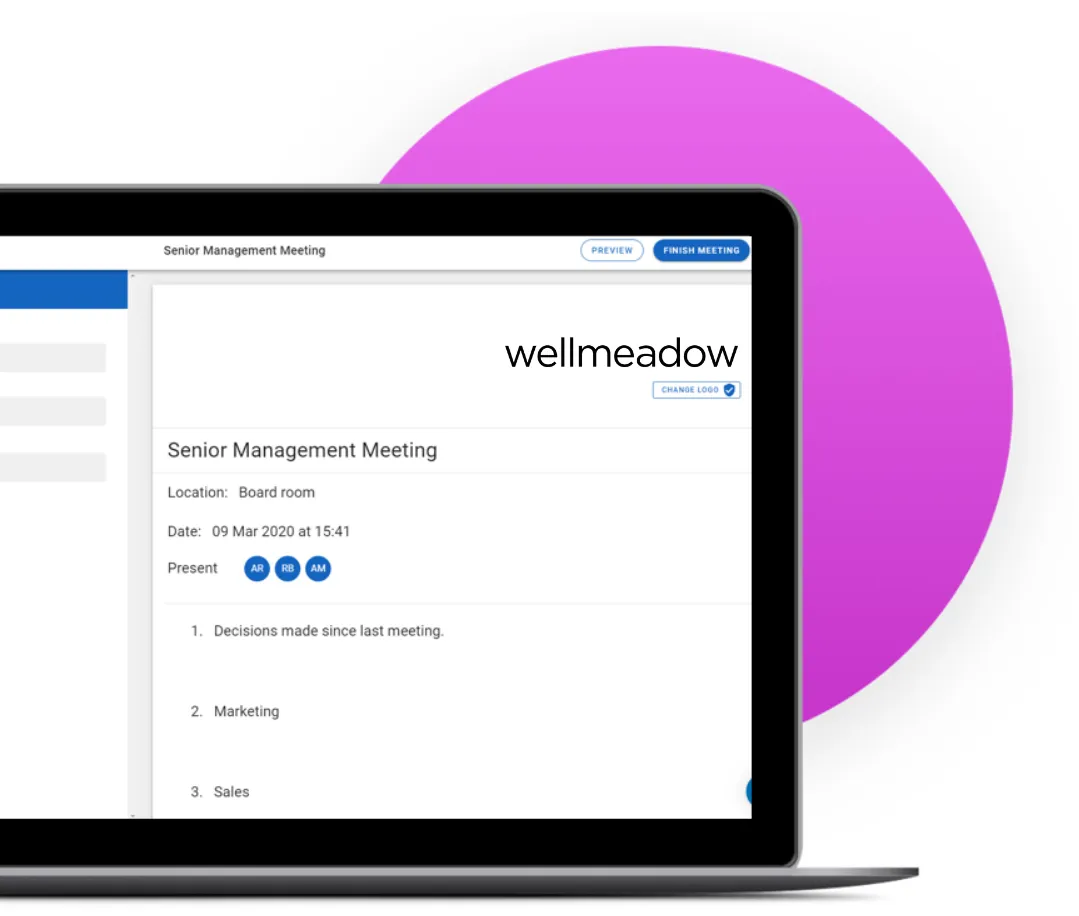
Magic Minutes is a UK tool built for the person who takes the minutes. Its guide to running a meeting shows the minutes typed live under each agenda heading, with an action added by typing “@” and filling in a description, owner and due date. When you click “Finish Minutes,” it emails the minutes and actions to attendees and offers to set up the follow-on meeting, and outstanding actions carry into the next meeting’s minutes. The help pages describe typing minutes yourself and don’t mention transcription.
Suits: an office manager or company secretary who writes minutes for regular management or board meetings and wants them sent the moment the meeting ends.
Price: only organizers pay. Attendees get a free account to read minutes, upload reports and close their actions. Premium is £60 a month for one minute taker and Enterprise £299 a month for up to 10, both including UK VAT, with a 30-day free trial (pricing, October 2026). Some review sites list a much lower price, so go by the vendor page. Note that the official site is magicminutes.co.uk.
What people say: we couldn’t find recent public user reviews we could open and check, so there are no quotes here.
Beenote
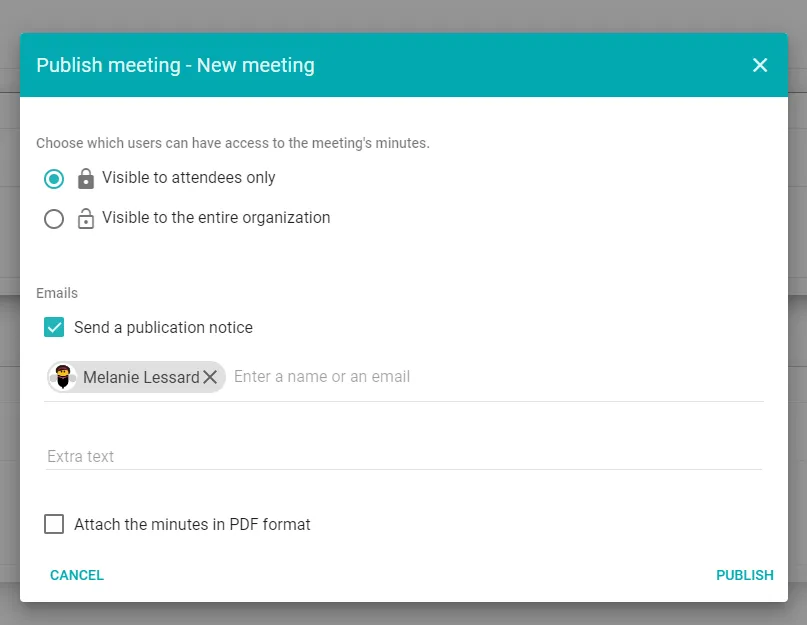
Beenote covers agendas, minutes and tasks for committees and teams, and sells a separate board tier called Beeboard. Its feature list includes agenda templates, review and approval of minutes before they go out, digital signatures, votes during the meeting, confidential minutes and an access log. Tasks can be shown as a Kanban board, table or list and synced with Microsoft To Do or Google Tasks. When you publish minutes, you choose whether only attendees or the whole organization can see them. AI features launched in 2026 (agenda drafts, minutes summaries) are sold as on-demand add-ons you can try before buying.
Suits: committees, school and nonprofit groups, and teams that work in Outlook and Teams and want formal minutes with approval but not a full board portal.
Price: Beenote costs $552 a year for 10 users (about $4.60 per user a month), and Beeboard $1,260 a year for 7 users. Every plan has a 30-day free trial with no credit card. After it ends, the account drops to a limited free mode in which the first 5 users keep access. Nonprofits can ask for a 20% discount (pricing, October 2026).
What people say: we found no recent public reviews we could open and check.
MeetingBooster
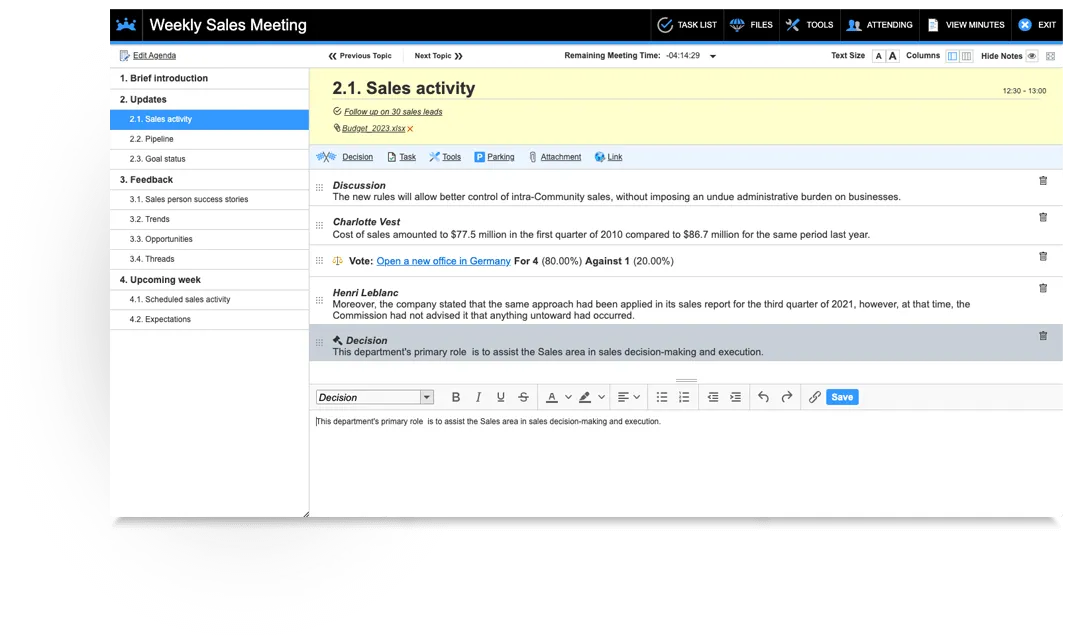
MeetingBooster, made by MatchWare, runs the meeting from a screen it calls the notecard. Per its minutes page, you open the scheduled meeting, take notes, decisions and votes under each agenda topic, and assign tasks, which go to their owners straight away. After approval the minutes are emailed as a PDF, and every set of minutes is kept in a searchable archive. You can control who sees which minutes, for example letting a department head see all meetings in their department. It can run in MatchWare’s cloud or on your own servers.
Suits: larger organizations with an IT department, especially ones that need on-premise hosting or a set approval process. It’s more than most small groups need.
Price: price on request. There’s no public pricing page; the site offers a free trial and a contact form (MeetingBooster, checked October 2026).
What people say: public reviews are few and mostly several years old, so there are no quotes here.
For boards and committees
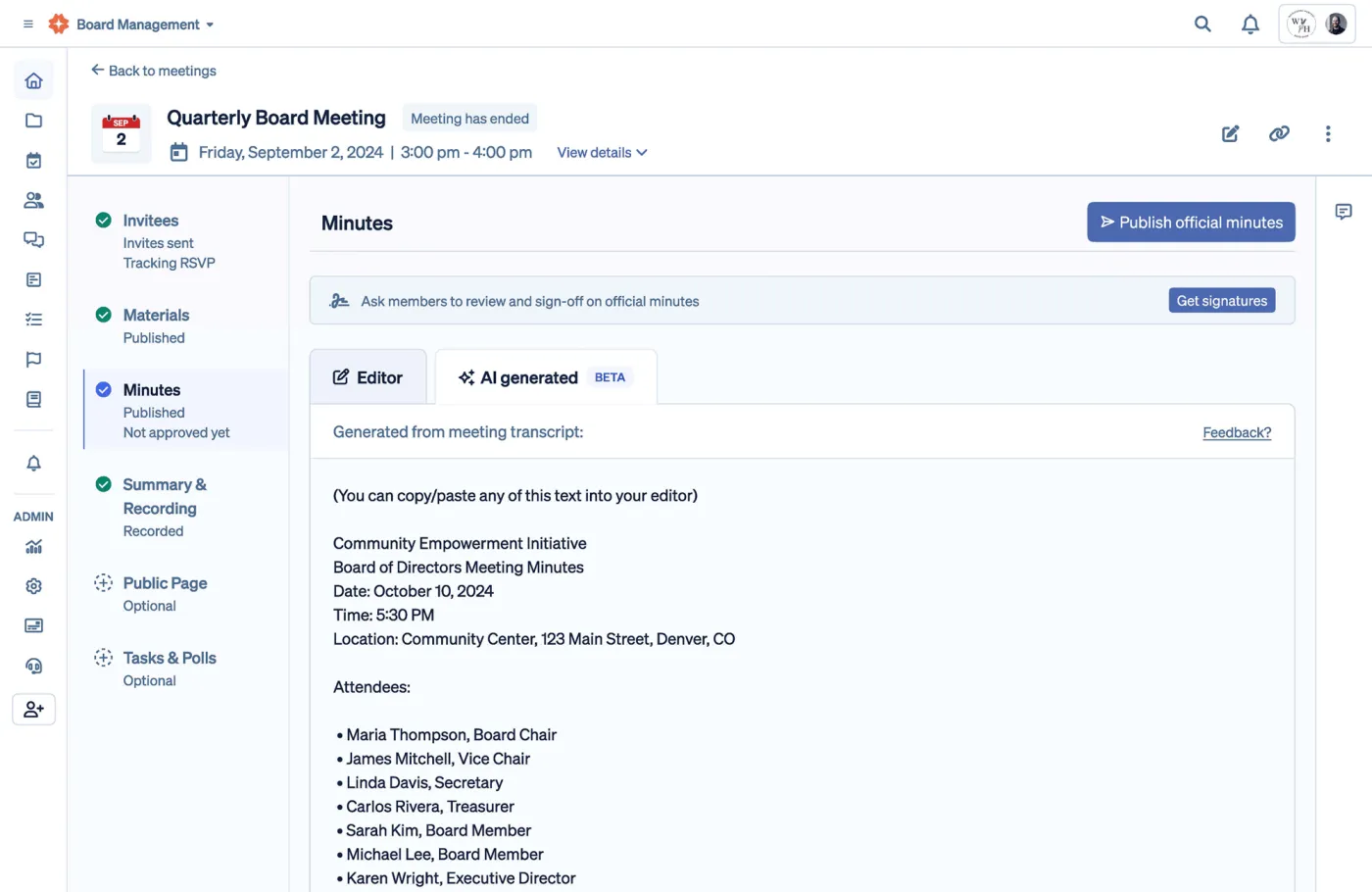
Boardable
Boardable is a board portal that puts agendas, board packets, signatures, minutes and votes in one place. Its minutes help article explains that you can start minutes from the agenda or from scratch, record them live during a Boardable Video call, and keep drafts visible only to admins, meeting owners and collaborators until you publish. The pricing page lists eSignatures for minutes from Professional up, a public page for agendas and minutes, and AI meeting minutes and transcripts on Professional+, though the help docs list them under Professional. When transcripts are turned on, the admin sets them for all meetings or none, not meeting by meeting.
Suits: volunteer and nonprofit boards that want agendas, board packets, votes and approved minutes in one place their directors will actually open.
Price: no free plan. Essentials starts at $20.99 per user a month, billed yearly at $251.88 per user. Professional is $29.99 and Professional+ $35.99 per user a month, also billed yearly, and volume pricing is available. The 14-day trial includes Professional features and needs no credit card (pricing, October 2026). Price it per board member: a 9-person board on Essentials is about $2,270 a year.
What people say: a board administrator on r/nonprofit described moving from a mix of email and SharePoint to “a portal (Boardable) that’s a much more streamlined experience”. On another thread, a board member said their board is better organized with it, then added: “But that platform has so many glitches that it gets old.” G2 rating: 4.5 from 273 reviews (G2, checked October 2026).
OnBoard
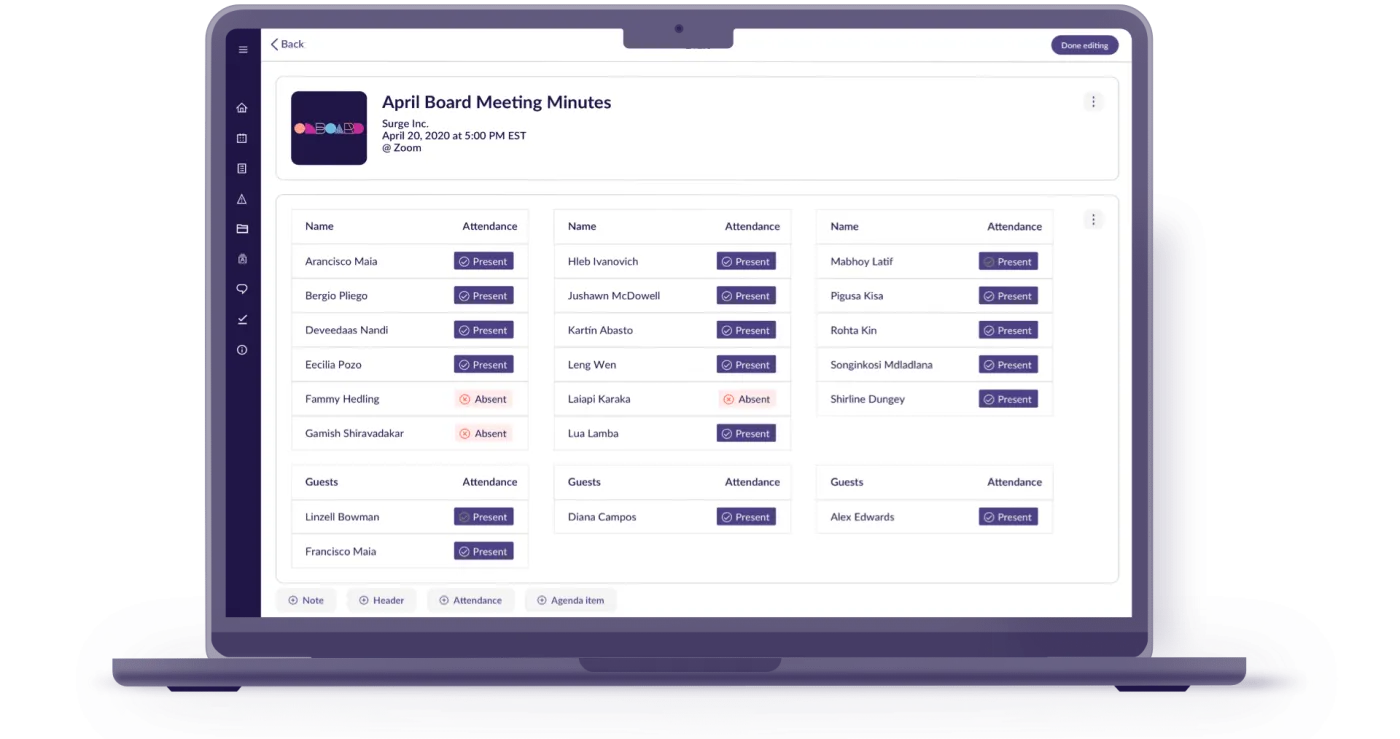
OnBoard is a board portal with plans that go up to organizations running several boards and subsidiaries. Its Minutes Builder uses templates, lets you log attendance, motions, votes and tasks during the meeting, and exports to Word or PDF. You can attach draft minutes to the next agenda for approval, send them for eSignatures, and publish them to the resource center with an audit trail. AI Minutes can produce a transcript only, an outline, or a first draft, or be switched off for a meeting.
Suits: larger boards, boards with several committees, and organizations with a dedicated board administrator.
Price: price on request, based on plan and number of users. The Minutes Builder, approvals, eSignatures and task management start at the Premium tier, not the entry Essentials tier. AI Minutes is part of the AI Suite add-on, which is included with Ultimate (pricing, October 2026).
What people say: on r/ExecutiveAssistants, one user who runs board and committee meetings and a policy library in it said: “Onboard works great for my purposes.” A small nonprofit on r/nonprofit said: “We are ditching OnBoard due to the very high cost — the ROI wasn’t there for an org of our size.” The same commenter thought it fits larger organizations, ones with many remote meetings, or ones with a dedicated admin. G2 rating: 4.7 from 692 reviews (G2, checked October 2026).
If your board is small and the main worry is whether a vote passed, the quorum and vote calculator and the nonprofit board minutes template may cover you before a portal does.
General document tools
These aren’t minutes software, but plenty of groups write their minutes in them. They do the writing part well. What they lack is the connection between meetings: no action items carried forward, no reminders, no approval step and no record of who signed off.
Google Docs
Docs is free with a Google account and easy to share with a whole board or team. If you use Google Calendar, typing “@” and choosing “Meeting notes” creates a page filled in with the event details, and the organizer can attach it to the event (Google help). Changes in the doc don’t flow back to the calendar. Action items are just text unless you assign them as comments, and approval happens by email. Start from the meeting notes template, which has the Google Docs steps, or the meeting minutes template.
Microsoft Word and OneNote
If your office already pays for Microsoft 365, you already have both. Word is a familiar format for formal minutes, and easy to print, sign and file. In OneNote on Windows, Home > Meeting Details pulls the date, location, agenda and attendees from an Outlook meeting onto a new page, as plain text you can edit (Microsoft support). That needs Outlook and OneNote on the same computer. Neither app follows up on action items for you. The meeting minutes template above downloads as a Word file, with steps for Track Changes and a signed PDF. For OneNote, see the OneNote meeting notes template.
Evernote
Evernote has meeting notes templates and tasks inside notes that you can assign, date and set reminders on. The free plan is small: 50 notes, 1 notebook and 1 device (compare plans), which won’t hold a year of weekly minutes. Recent price increases have drawn complaints. On Trustpilot, one user said: “I really love Evernote but was very disappointed with the huge increase for the premium version.” It makes sense mainly if you keep the rest of your notes there already.
Notion
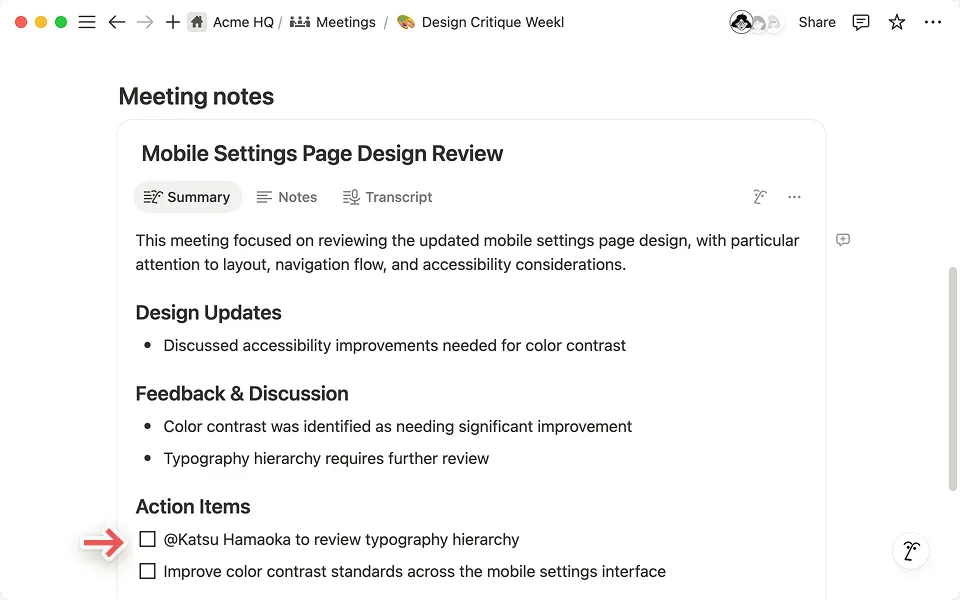
Notion works well when you want minutes in a shared database: one page per meeting, sorted and filtered by date or meeting type, with action items as checkboxes or linked tasks. Its AI Meeting Notes feature records from your device without a bot joining the call, and produces a transcript and a summary with action items (Notion help). It prompts you to tell participants and get their consent first. There’s no built-in approval or signature step. The free plan suits one person; a workspace with two or more members hits a block limit. Plus is $10 per member a month billed yearly, and AI Meeting Notes needs Business at $20 (pricing, October 2026). The Notion meeting notes template is a good starting layout.
AI note takers
Otter.ai
Otter records and transcribes a meeting, then produces a summary with action items (Otter for business). That gives a minute taker a full record to write from, but a transcript isn’t minutes: someone still has to pull out the decisions, motions and owners and write them in your format.
The free plan stops each recording at 30 minutes and gives 300 minutes a month. Pro is $8.33 per user a month billed yearly or $16.99 monthly (pricing, October 2026). One reviewer on Trustpilot wrote in September 2026 that only the first half of a 60-minute board meeting was captured on the free plan. On Reddit, one user said: “I’ve tried Otter but it feels really bloated.” Another said of asking questions across past meetings: “I use Otter now and that’s the main feature I love.” G2 rating: 4.4 from 505 reviews (G2, checked October 2026). In August 2025, a proposed class action was filed in federal court in California alleging that Otter records meetings without all participants’ consent (NPR via KAXE).
Before recording any meeting, tell everyone and follow your organization’s rules and local law. The best AI note takers guide compares Otter with Fireflies, Fathom, Granola and the AI built into Zoom, Google Meet and Teams.
FAQ
Is there free meeting minutes software?
Yes, with limits. Fellow has a free plan for up to 5 seats with a small lifetime AI allowance. Magic Minutes is free for attendees, but the minute taker pays. Beenote keeps a limited free mode for 5 users after its trial. Google Docs, Word for anyone already on Microsoft 365, and Notion’s free plan for one person also work well with a template. The board portals (Boardable, OnBoard) have trials but no free plan.
What software do boards use for meeting minutes?
Many small and volunteer boards use Google Docs or Word with a template and email the draft for approval. Boards that need packets, votes, eSignatures and controlled access use a board portal such as Boardable or OnBoard, or Beenote’s Beeboard. Start with the board meeting minutes template and move to a portal when email and shared folders stop working.
Can I just use Word or Google Docs for minutes?
Yes, and most small groups do. Keep one document per meeting in a shared folder, use the same template each time, and copy open action items into the next meeting’s agenda. What you lose is automation: no reminders, no action items carried over for you, and no record of approval besides email.
Do meeting minutes need to be approved or signed?
In most formal bodies, the draft minutes are presented at the next meeting, corrected if needed, and approved by a vote. Many boards then have the secretary or chair sign the approved copy. Whether a signature is required depends on your bylaws, your organization type and where you’re based, so check your governing documents or ask your own advisor.
Should I use an AI note taker instead of minutes software?
They do different jobs. An AI note taker gives you a transcript and a summary to work from. Minutes software gives the minutes a home: an agenda, action items that carry forward and an approval step. Some teams use both. If you record, tell everyone first, and remember a summary still needs a person to check the decisions and owners before it becomes the official record.