Meeting Notes Template
Templates / General templates
Meeting minutes

Meeting minutes template

Meeting minutes are the official record of a meeting: who attended, what was decided and what happens next. They are shorter than notes and leave out most of the discussion. This template follows the order most committees and boards use, from call to order to adjournment.

Need informal notes for a team meeting? Use the meeting notes template instead. Taking minutes for a committee that reports to a board? The committee meeting minutes template adds the committee's charge, progress and recommendations.

Best forCommittees, nonprofit and volunteer boards, formal team meetings
SectionsAttendance, approval of minutes, reports, motions and decisions, action items, next meeting
ApprovalUsually approved at the next meeting
FormatsWord .docx download, Google Docs (copy and paste), Notion, Markdown
Word Markdown
[Group name] meeting minutes.docx
[Group name] meeting minutes
MeetingRegular / Special / AnnualDate and time Location Chair Minutes taken by StatusDRAFT, not yet approved

Attendance and quorum

Present: Absent: Guests: Quorum: [number] required, [number] present

Call to order

Called to order at [time] by [chair].

Approval of previous minutes

Approved as written / approved as corrected:

Reports

  • Report, presented by, one-line summary

Old business

  • Item carried over, what happened, still open or closed

Motions and decisions

Motion or decisionMoved / secondedResult
   

Action items

ItemOwnerDue
   

Next meeting

Date, time, location

Adjournment

Adjourned at [time].

Approval

Submitted by: [name], Secretary, [date] Approved on: [date], as written / as corrected

Word MarkdownPastes into Google Docs, Word or Notion with headings and tables intact.
Best forCommittees, nonprofit and volunteer boards, formal team meetings
SectionsAttendance, approval of minutes, reports, motions and decisions, action items, next meeting
ApprovalUsually approved at the next meeting
FormatsWord .docx download, Google Docs (copy and paste), Notion, Markdown

Meeting minutes format

Most minutes, sometimes called MoM (minutes of meeting), follow the same format: a header, then the business in the order it happened, with one short entry for each item. Write in the past tense, record what was done rather than what was said, and keep each motion in the exact words the group voted on. The usual order, which this template follows:

Using this template in Word

Download the .docx with the Word button above, or copy the template and paste it into a blank Word document. Then:

Using this template in Google Docs

Click Copy template, open a blank Google Doc and paste. Then:

When to use this template

Real examples

Minutes that real organizations have published, with what each one does well. Open the original to read it in full.

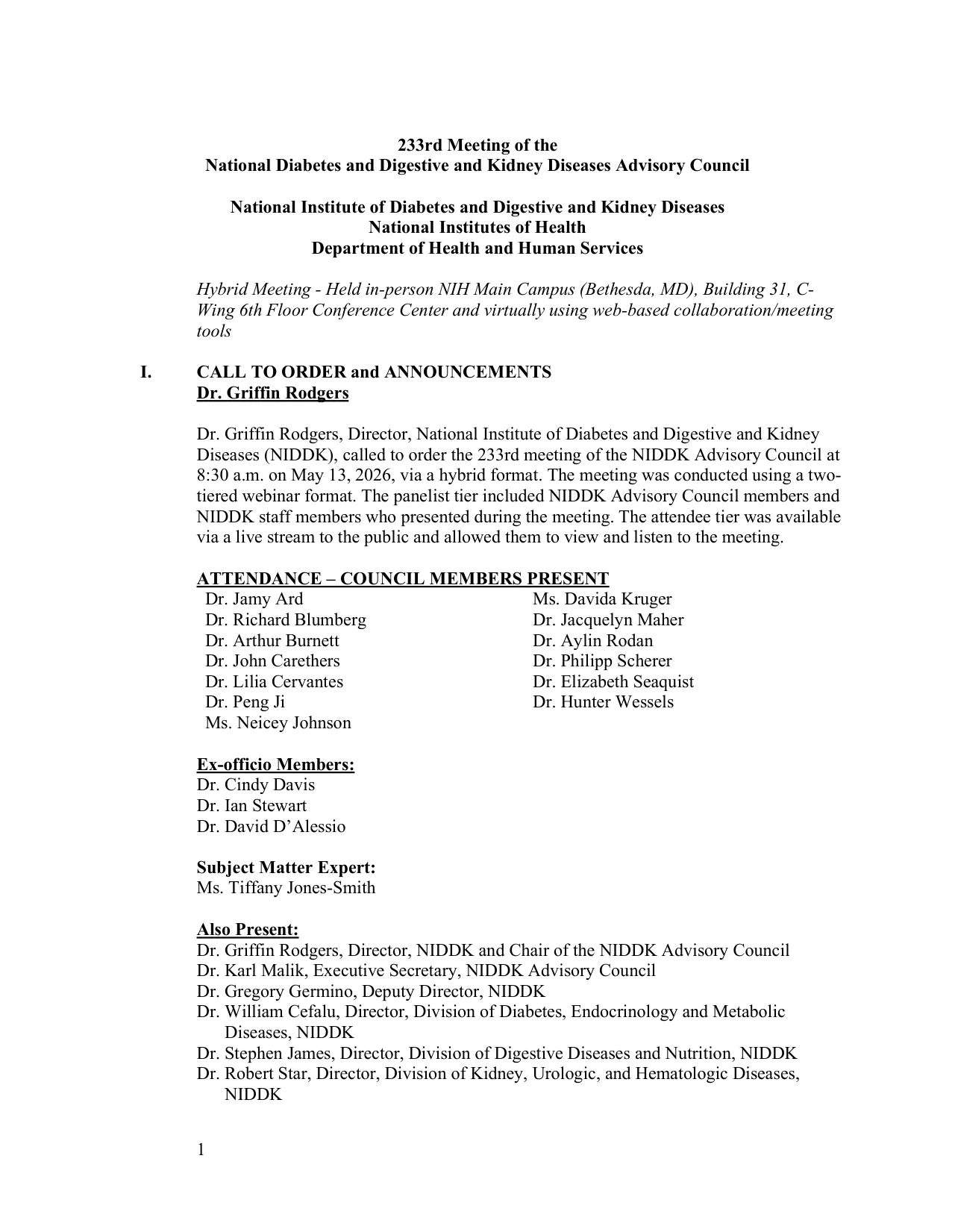
First page of the NIDDK Advisory Council minutes for May 13, 2026, with the call to order and members present by role

National Diabetes and Digestive and Kidney Diseases Advisory Council (NIH)

233rd meeting, held in person and online · May 13, 2026
What it does well
  • Says how the meeting was held (in person and online), when it started, and who attended by role: members, ex officio members, an expert and staff.
  • Each closed session gives the legal reason it was closed and records that members with a conflict left for that discussion and vote.
  • Ends with the chair's certification that the minutes are accurate and complete, which federal advisory committees must have.
Worth doing differently
  • No list of members absent and no quorum statement.
  • Section VIII, the executive closed session, is a heading with nothing under it. If nothing can be recorded, one line saying the session took place and whether any action was taken is enough.
I hereby certify that, to the best of my knowledge, the foregoing summary minutes are accurate and complete.
View the originalWork of the US federal government, public domain (17 U.S.C. §105)
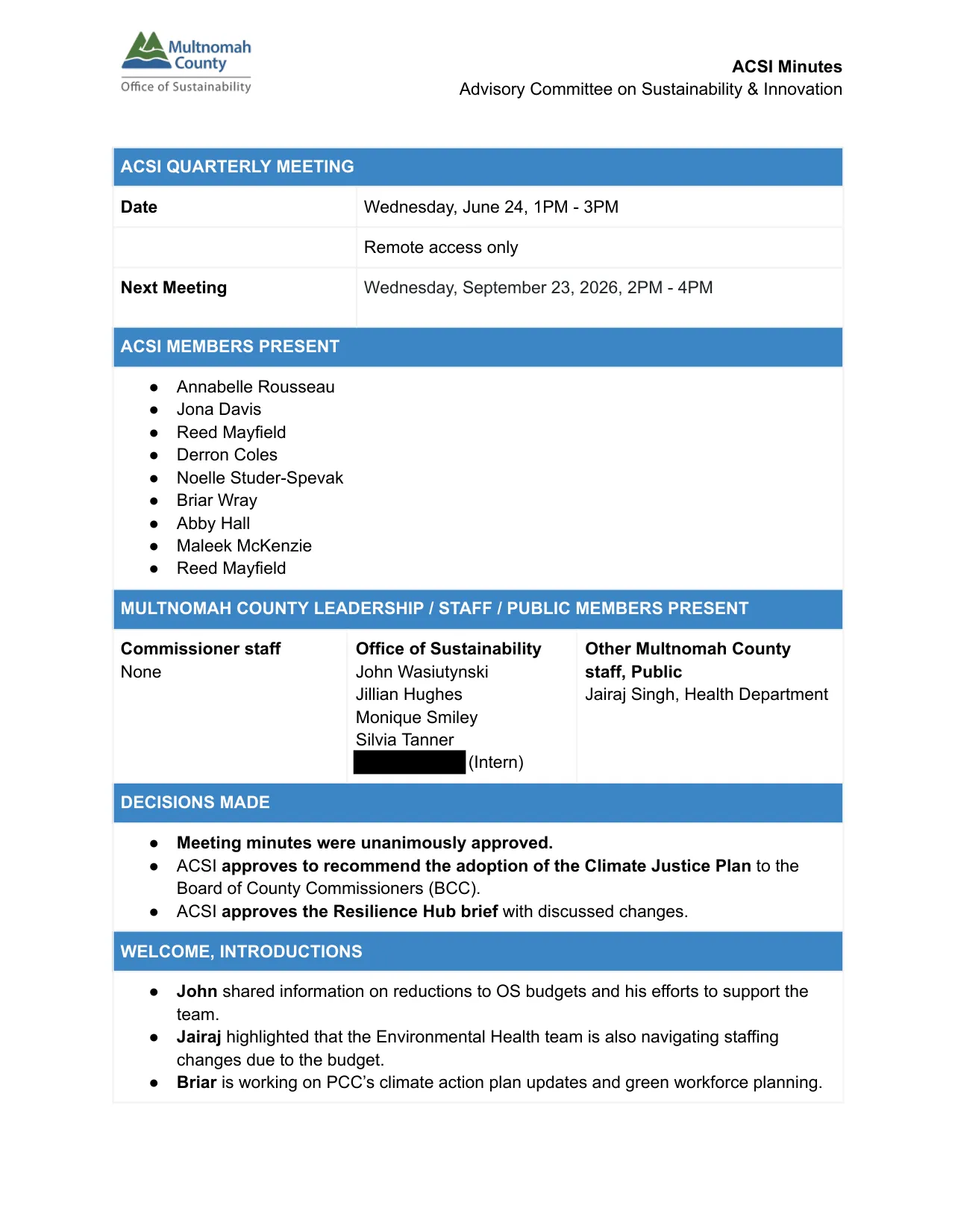
First page of the Multnomah County ACSI minutes for June 24, 2026, with the next meeting date, members present and a Decisions made list

Multnomah County Advisory Committee on Sustainability & Innovation

Quarterly meeting (online) · June 24, 2026
What it does well
  • A "Decisions made" list at the top gives the three outcomes before any discussion.
  • The next meeting's date and time sit in the header, where people look for them.
  • Names who moved the motion and who voted for it.
Worth doing differently
  • One member is listed twice under members present, and the vote names four members in favor plus the mover out of eight present, with nothing on the other three. Record every vote, or the count for, against and abstaining.
  • The one next step names a subcommittee and "Staff" but no person or date. The template's Action items section has room for both.
Derron moved to approve the brief with the mentioned changes and additions of graphics. Maleek, Abby, Annabelle, and Briar voted in favor.
View the originalPublished by Multnomah County; short excerpt quoted with a link. An intern's name covered in the image.

Questions people ask

Do meeting minutes need to be approved?
For boards, committees and most nonprofits, yes. Minutes are usually circulated as a draft and approved at the next meeting. Check your bylaws for the exact process.
How detailed should minutes be?
Record decisions, not debate. Most groups only need the motion, the result and the action items. Long summaries of who said what create arguments later and rarely help anyone. How to write meeting minutes covers what to leave out.
What is the difference between minutes and meeting notes?
Minutes are a formal, approved record of decisions. Notes are an informal working document for the team. Many teams only need notes. Groups that vote or answer to members need minutes. Meeting notes vs minutes compares the two in more detail.
Does Word or Google Docs have its own minutes template?
Word does: go to File > New and search for minutes to see Microsoft's online templates (the search needs an internet connection). Google Docs has a Meeting notes block: type @, choose Meeting notes and pick a calendar event, and Docs fills in the event's details. Both suit informal notes better than a formal record, so check for room for attendance and quorum, the exact wording of each motion and the vote result before you use one.
Should approved minutes be kept as a Word file, a Google Doc or a PDF?
Keep the .docx or the doc as your working copy and file a PDF of each approved set, because a shared doc can still be edited by anyone with Editor access and a Word file can change by accident. Some groups also print and sign the approved minutes for a minute book. Your bylaws or operating rules decide what is required.
Can several people take minutes in the same doc?
It works better when one person writes and everyone else suggests corrections afterward. Two people typing in the same section during a vote is how a motion ends up recorded twice with different wording.

Sources

Related templates